
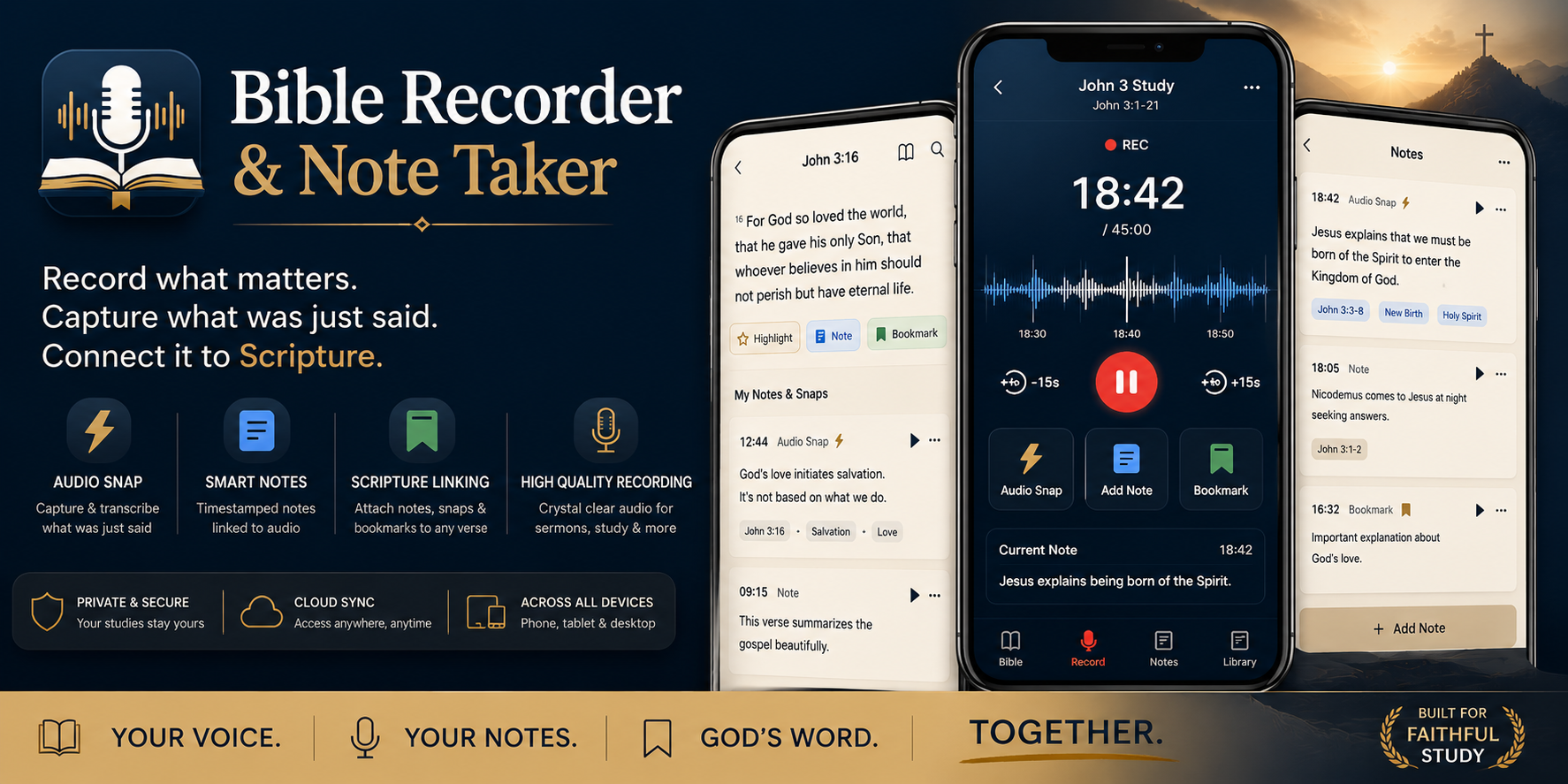
Bible Recorder & Note Taker began with a simple need: keep the words that matter connected to the moment they were heard. A sermon, Bible study, or personal reflection can move quickly. The useful sentence may arrive while a recording is running, while a verse is open, or while a note is still half formed. The app is being shaped around that real situation instead of splitting recording, Scripture, and notes across unrelated screens.
Version 1.0.0 is the first Android release of that direction. It is a focused, reference-led build with a dark navy study console, warm cream reading surfaces, selective gold accents, and rounded edges throughout. The supplied design reference is intentionally spacious: a large central recording surface, clear transport controls, linked notes, a Bible reader, and a library that makes the whole study history feel like one place.
The redesign follows the reference image
The most important change was structural, not decorative. The recording screen now leads with the elements shown in the reference:
- a rounded deep-navy recording console;
- the study title and Scripture context at the top;
- a visible recording state and large elapsed timer;
- a broad waveform with a timeline scale;
- skip-back and skip-forward controls around the main record or pause action;
- three equal quick-action cards for Audio Snap, Add Note, and Bookmark;
- a Current Note panel beneath the controls; and
- a four-item mobile navigation bar for Bible, Record, Notes, and Library.
The palette uses deep navy, near-black surfaces, warm cream reading cards, and gold for meaningful actions. There are no gradients. Rounded cards and controls create the softer edge treatment requested for the app while keeping the recording workspace visually calm and readable.
Recording and Audio Snap
The recording console is built for one-handed capture. Starting a recording requests microphone access and begins the timer. While recording, the main control becomes a large pause button; pausing and resuming keep the session in place. The -15s and +15s controls move the current position while the session is active, so the listener can return to an earlier sentence or move forward again.
Audio Snap is the small action that gives the product its own character. When the user taps Audio Snap during a recording, the app preserves the recent rolling audio window and records the exact timestamp in the current session. That snap can then be associated with the note the user is writing at that moment. It is meant to answer a practical question: “What was just said?”
The current release does not pretend that transcription is already connected. The app records and preserves the audio relationship locally, but automatic speech-to-text remains unavailable until a transcription service is configured. That boundary is visible in the UI and in the project documentation rather than being replaced with sample text.
Scripture belongs beside the note
The Bible reader is included in the app so a user can study without leaving the recording workflow. The current bundled reader uses a structured Geneva 1560 dataset with book, chapter, and verse navigation. A reader can copy a selected verse, copy a chapter, or add Scripture to a note. The note can then retain the reference along with the user’s own reflection.
The local data folder was checked during preparation. It contains source/reference material, including large document files, while the app consumes the deployable structured Bible data under public/data. The original source documents are not silently bundled into the Android APK, and the release does not imply that every translation or source document has already been imported. That keeps the APK smaller and makes the content boundary clear.
Notes, Library, and search stay honest
Notes, bookmarks, recordings, and Audio Snaps are intended to meet in the Library. Search indexes the records that actually exist on the device and can also search the bundled Bible text. Notes and Search have deliberate empty states for a new installation.
There is no fake “John 3 Study,” fabricated sermon note, or pretend Audio Snap seeded into the first-run experience. The reference image shows the product’s intended information architecture; the installed build shows what a clean user workspace looks like before the user creates anything. That distinction matters for a notes app because invented content can look like the user’s own memory.
Local-first now, personal cloud storage by design
The app is designed to remain useful locally. Study metadata and user-created records can begin on the device, and the Bible reader does not depend on a network connection.
For account and synchronization features, the planned connected path uses Firebase Authentication for Google sign-in and Firestore for compact study metadata. Firebase is still needed for the identity and sync layer even when recordings themselves are kept in the user’s own Google Drive. The Drive integration is intended to use the signed-in user’s account and the least-permissive file access needed by the app, rather than placing everyone’s recordings into a shared storage bucket.
The first APK should therefore be understood as the foundation of the connected workflow, not as proof that every cloud permission path has been completed end to end. Google sign-in, Firestore synchronization, Drive file creation, offline conflict handling, and recovery behavior still need to be exercised with a real Firebase project and real user consent before they should be described as production-ready.
Android release details
The build is a Vite and React front end wrapped for Android with Capacitor. The application package is com.mcographics.bibleaudionotetaker. Version 1.0.0 targets Android 7.0 and newer and is distributed as a direct APK through GitHub Releases.
The source repository and APK are available here:
- Bible Recorder & Note Taker source on GitHub
- Download Bible Recorder & Note Taker 1.0.0
- Read the v1.0.0 release notes
This is a GitHub APK release, not a Google Play publication. Android may require users to allow installation from the source they use to download the APK. The release signing key is kept outside the repository; the APK’s checksum and signature status are recorded with the release handoff.
What was verified
The Vite production build completed successfully, Capacitor synchronization completed, and the Android release build completed successfully. The release APK was checked with Android’s signing verifier and has a single valid v1/v2 signer.
The redesigned build was also installed and launched on a connected Samsung SM-G781W during preparation. The captured screens show the actual recording console, the Bible reader, the clean Notes state, and the Search state. The screenshots on the project page are direct captures from that installed Android workflow, not generated product mockups.
That verification covers the build, launch, and visible surfaces captured. It does not claim a complete device matrix, Play Store review, or a full end-to-end Firebase/Google Drive upload test. Those are the next release gates.
The next useful steps
The product is now visually much closer to the supplied design direction and has a clean release foundation. The next meaningful work is not more decorative filler. It is to connect the remaining real workflow:
- finish and test Google sign-in through the configured Firebase project;
- create and restore Firestore study metadata safely;
- authorize user-owned Google Drive recording storage;
- add a real transcription provider behind an explicit service-status boundary;
- add export and recovery tools for notes and recordings; and
- test the release on additional Android devices before considering store distribution.
Bible Recorder & Note Taker is meant to be a place for a voice, a note, and God’s Word to come together. Version 1.0.0 is the first clean Android foundation for that idea.